
AB Testing
Do I Always Need a Developer to Run an A/B Test?
For a long time, A/B testing on Shopify meant choosing between a limited visual editor or looping in a developer. There's a whole world in between and most brands haven't discovered it yet.

Carlos Trujillo
You need a developer less often than you think. These days, most of the test variants you can imagine can go live without writing a single line of code, leaving developer involvement only for very specific situations. That's good for your testing velocity, and good for your developers, who can stay focused on the product work only they can do.
How it used to work
This wasn't always the case. For a long time, running A/B tests on a Shopify store came down to two extremes:
Using a no-code editor for the basics. Change a headline. Swap an image. Edit some copy. Fast, no developer needed, but limited to content already rendered on the page, or very limited modules available on testing tools.
Looping a developer for anything slightly more complex. Write the code, test and QA the change, ship it. Powerful, but a ticket, a timeline, and a build process attached to every idea, and more often than not, that meant building an entirely new template or spinning up a full theme variant, while maintaining a control version in parallel for the duration of the test.
Two things most Shopify brands don't know about A/B testing
However, there are two key aspects a lot of teams haven't yet connected the dots on. The first still involves a developer, but in a much lighter way than you might expect. The second removes the developer from the equation entirely for most use cases. Once you understand both, the "do I need a developer?" question looks very different.
You can inject code as a content test. A developer writes a variant in JavaScript and CSS and injects it directly into the page. No new theme, no Shopify template changes, no long build process. The test runs exactly like any other content test. In practice, many experienced experimentation agencies default to this approach precisely because it keeps testing velocity high without the overhead of spinning up a theme or template every time.
The AI Visual Builder. Intelligems' recently launched AI Visual Builder removes the developer from the picture entirely for most content changes. Describe what you want, and AI builds it for you. More on that below.
What the full spectrum looks like
Testing with Intelligems covers a lot of ground: pricing tests, shipping fee experiments, and a whole range of revenue levers beyond content.
This post focuses specifically on the content side: how you actually build and deploy variants that change what visitors see on your site. Intelligems offers four ways to do it, covering everything from a quick headline swap to a full site redesign.
Visual Experience Builder
The Visual Experience Builder lets you click any element on your site and modify it at will: copy, color, images, HTML. No code required. It works on content that's hard-coded in the DOM, meaning text and HTML already rendered in the page when it loads.
No developer needed, and it's the fastest test to set up. If your team runs without engineering support, this is where to begin.
AI-Powered Building
The AI Visual Builder takes the no-code experience further. Describe the change you want in natural language ("add a 20% off banner above the header," "make the CTA more prominent," "simplify the product description") and AI builds it for you, brand-matched. And you're not limited to editing what's already on the page. You can prompt it to create entirely new elements too: a trust badge, a promotional module, a custom section, built from scratch. The result is inspectable, editable, and adjustable directly in the Visual Builder before you go live.
For non-technical teams, this is where the game changes. Ideas that used to sit in a backlog waiting for dev capacity can go from prompt to live test in minutes. Anyone on the team can now build variants that would previously have required a developer and a ticket.
Code Mode
When the Visual Experience Builder isn't enough but a template or theme change would be overkill, Code Mode lets a developer inject custom JavaScript, CSS, and HTML directly into the page. Intelligems handles the split and measurement exactly as it would for any content test.
This unlocks complex layout changes, custom interactions, and dynamic DOM manipulation without spinning up a new theme or touching Shopify's template files. It's a content test with full developer-level power. And because it runs as a content test, you skip the overhead of theme variants and control version management. Use the JavaScript API to get started.
Pro tip: For certain changes, there's an even simpler path. If you can get an element into the DOM in advance (your developer adds it once, hidden by default), Intelligems can show or hide it using CSS alone. No complex JavaScript needed, no full variant build. It's a useful pattern for modules or components you plan to test repeatedly.
Edit in Shopify: Template and Theme Tests
For changes that need to happen at the server level, Intelligems integrates directly with Shopify's native editor so your team can build and test variants the same way they build the rest of the store.
Template Test
A template test serves a different Shopify template to a segment of your traffic: across all product pages, all collection pages, or another defined section. Because you're working at the template level, you can modify anything in those pages, including content that's rendered server-side from the backend: different Liquid logic, metafield-driven content, how the theme fetches and renders data at the server level. You'll typically want developer involvement for this one.
Use template tests when the hypothesis genuinely requires server-side access. Not as a default.
Theme Test
A theme test redirects a portion of your traffic from your live theme to a preview theme, running two completely different versions of your site simultaneously. This is the right option for full redesigns, new navigation structures, or validating a major theme upgrade before it goes live for everyone.
Theme tests need a developer. You're building a second version of your entire theme. Reserve this for situations that genuinely call for it.
How to decide
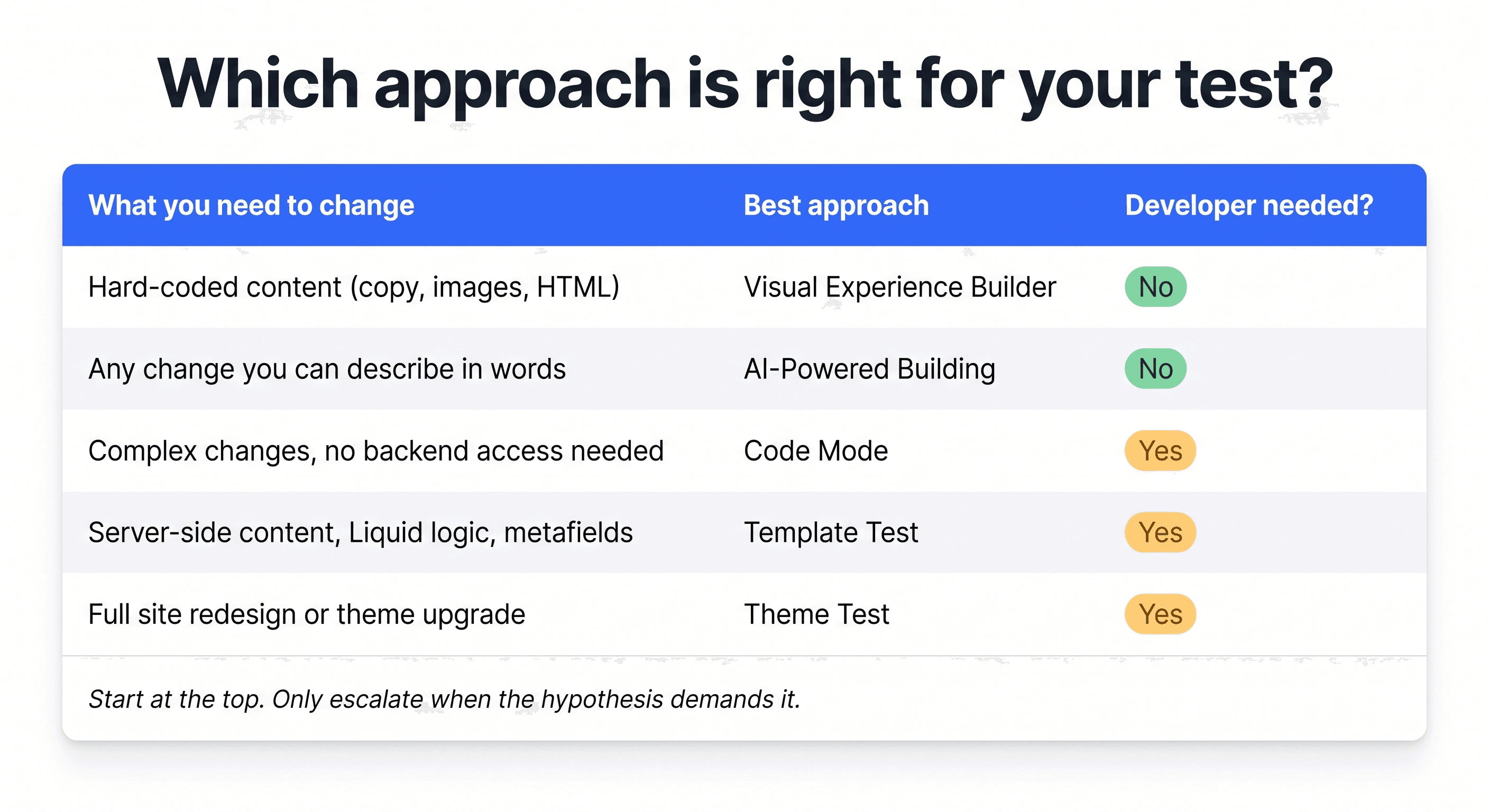
The table above is ordered by complexity, from lightest to most involved. Start at the top and only go further when the hypothesis actually demands it.
And remember that how the test is built doesn't determine its business value. A well-built content test on a high-traffic PDP can move profit per visitor just as meaningfully as a full template test. A pricing test or shipping rate experiment can move your unit economics more aggressively than almost any content change, and they're among the simplest to set up.
Technical complexity and business impact don't move together as much as people assume. Match the tool to what the hypothesis actually requires, not to how important the test feels.
Expert Guide
Product Updates
Campaigns


