Price Testing
Shopify Smart Pricing vs. Intelligems
If you run a Shopify store, you probably got an email this week. Shopify Smart Pricing is now available for your store at no extra cost. Mark up bestsellers. Mark down slow movers. The AI will tell you what to do.
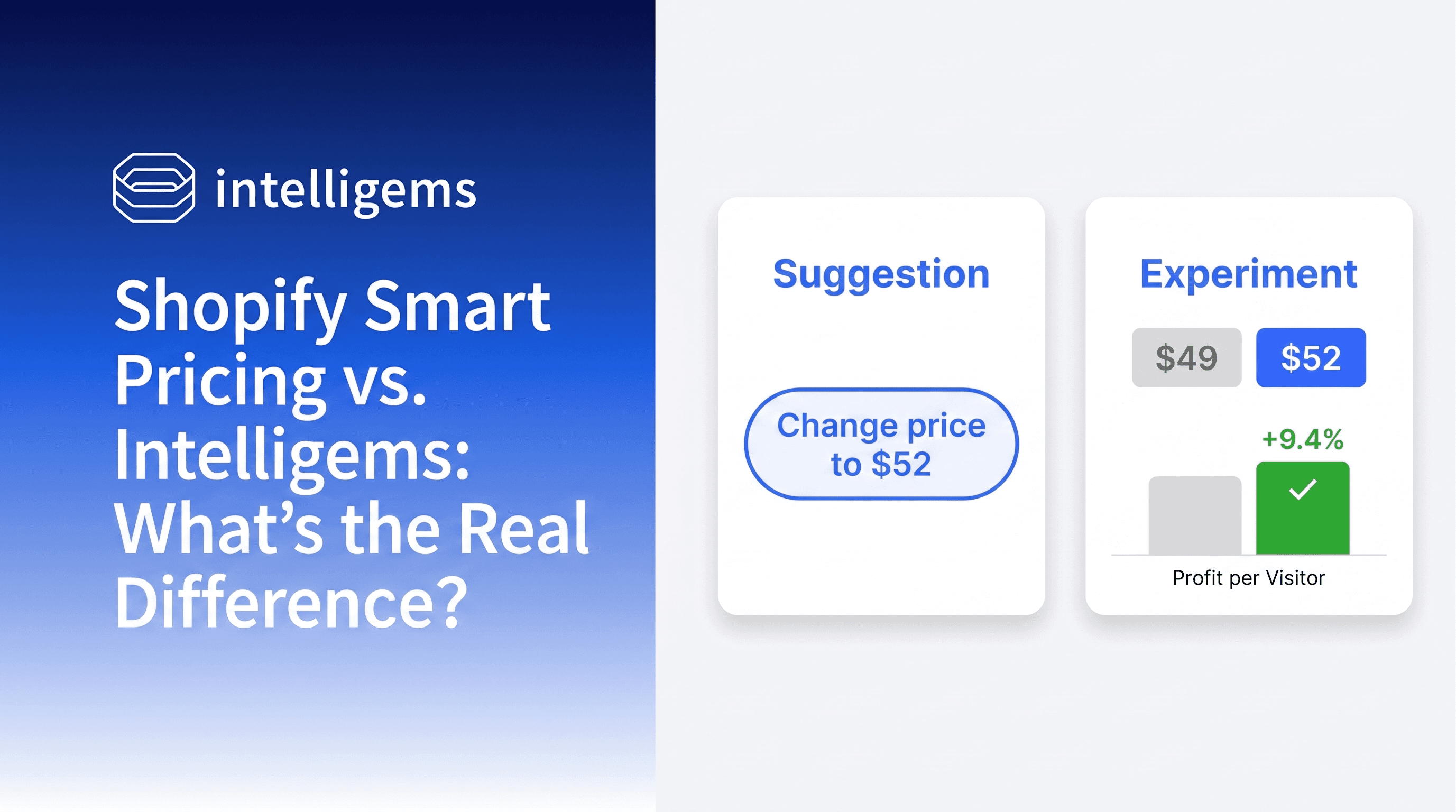
If you run a Shopify store, you probably got an email this week. Shopify Smart Pricing is now available for your store at no extra cost. Mark up bestsellers. Mark down slow movers. The AI will tell you what to do.
It's a fair question to ask, then. If Shopify is giving me price recommendations for free, why would I pay for a tool like Intelligems?
The short answer: they're solving different problems. One tells you what price to charge. The other proves which price actually makes you more money.
That distinction sounds small. It changes everything about what you can learn from your prices, and it shows up in the fine print of how each tool works.
What Shopify Smart Pricing Actually Does
Shopify Smart Pricing has two modes, and they're easy to confuse.
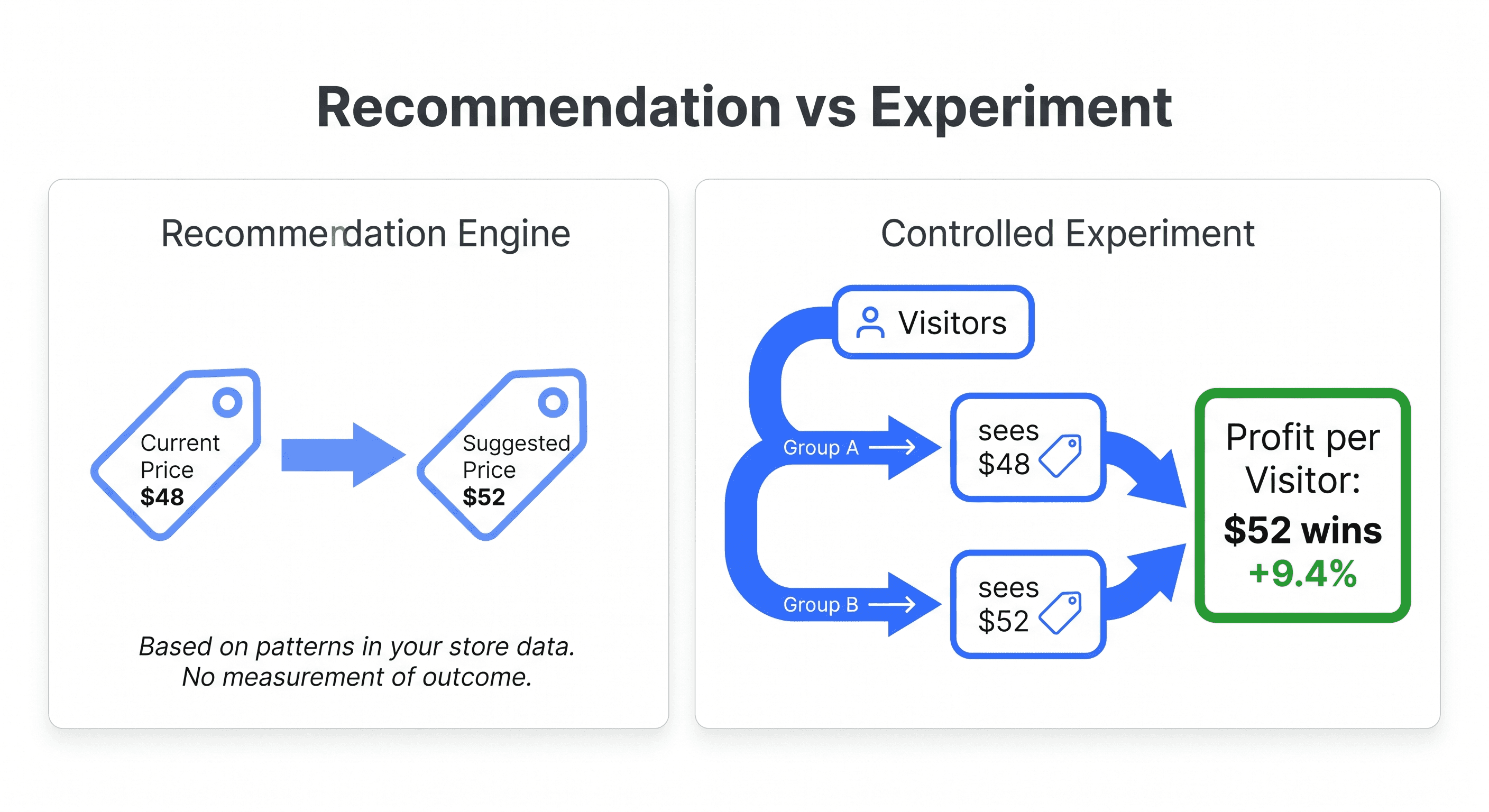
Mode 1: Markdown and markup recommendations. This is the mode the broader rollout is promoting. Shopify's model looks at your sales, inventory, and seasonality, then suggests a price change. Mark up bestsellers. Mark down slow movers. You apply the suggestion, and prices refresh on a weekly cadence. There's no traffic split and no control group, so Shopify isn't measuring whether the new price beat the old one. It's making a recommendation based on patterns it sees in your store data.
A few things worth knowing about how the recommendation engine actually works, per Shopify's own docs:
It optimizes "for profit at the store level, rather than the product level." So a single product tip might not be the best price for that product. It's the best price for your store overall, according to the model.
It "typically generates small adjustments, as opposed to larger price swings."
It does not use competitor pricing, geographically localized data, or any customer-level information.
Only one tip is generated per product, and that tip applies to all variants at once.
Products are excluded if they're less than 30 days old, had a price or cost change in the last 30 days, or were in an experiment in the last three months.
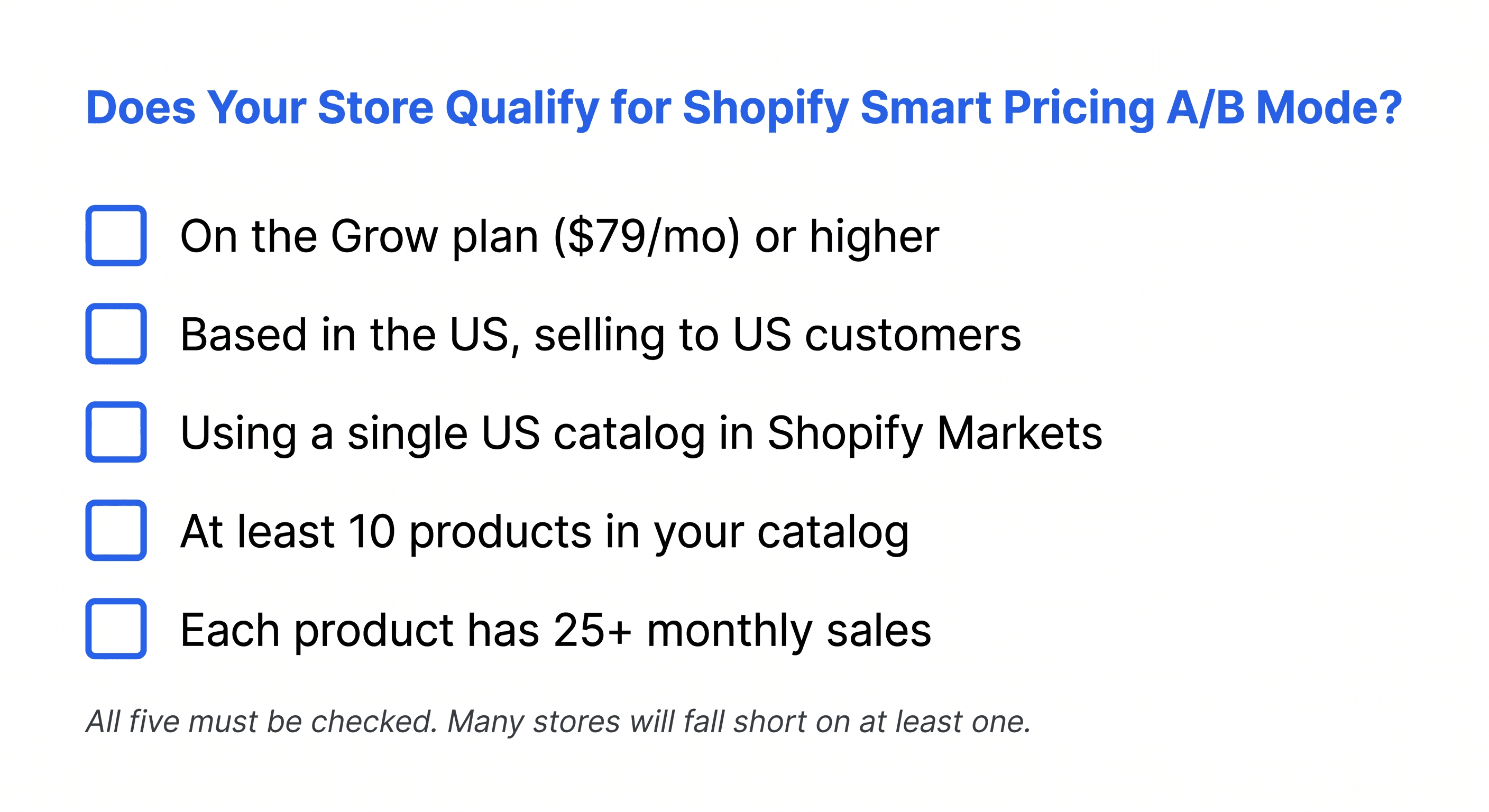
Mode 2: AI-driven price tips with A/B experiments. This is a separate feature, and the eligibility bar is much higher. Your store has to be on the Grow plan or higher, US-based selling to US customers, and use Shopify Markets with a single US catalog at the top level. You need at least 10 products with 25 or more monthly sales each.
There's one more catch worth flagging. According to Shopify's docs, stores receive only one tip type, not both. So you're either in the recommendation engine bucket or the experiment-tip bucket. You don't get both running side by side.
Where the A/B Mode Has Friction
If your store qualifies for the experiment mode, it's a real A/B test. Shopify splits your customer base 50/50 between the control price and the test price, runs the experiment, and reports daily results.
There are a handful of constraints buried in the setup docs that matter once you start using it:
No results for at least 4 days. If you stop the experiment before day 4, you get no results at all. After day 4, ending an experiment takes another 2 days to produce final numbers.
250-product cap per experiment, and only one experiment can run at a time.
95% confidence threshold. The platform marks results "Conclusive" only when statistical significance reaches 95%. That academic bar exists for medical trials where the cost of being wrong is permanent. For an e-commerce price test where you can change the price back, it can mean waiting weeks longer than the decision actually requires.
No automatic profit warning. Shopify tells you "merchants should manually monitor for negative profit impact." If your test price is bleeding profit per visitor, the tool won't flag it. You have to catch it yourself.
You can't remove products mid-experiment without stopping the test entirely.
The biggest one, though, is what happens after you win.
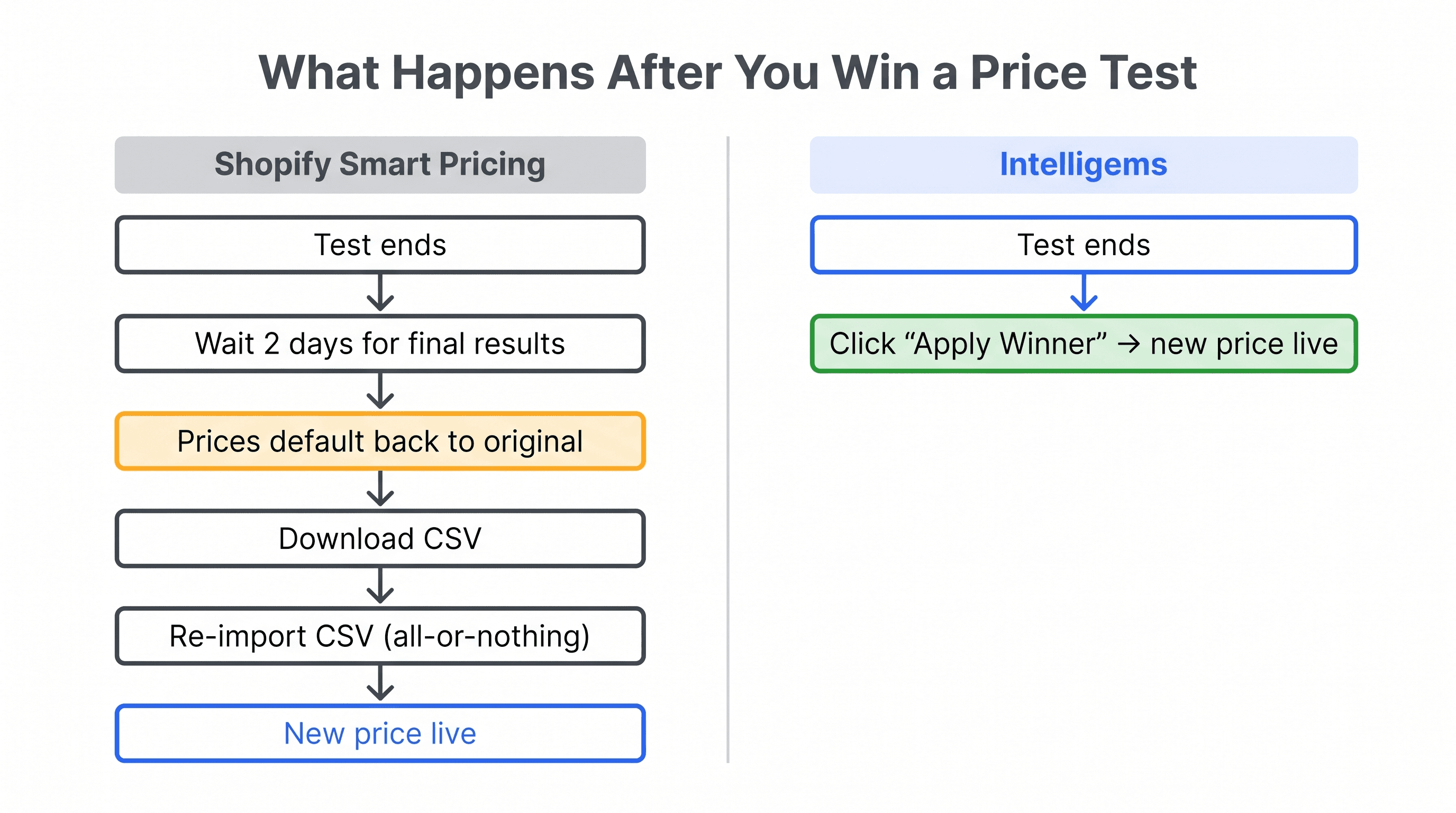
When the experiment ends, the results docs state that "the Smart Pricing app defaults to using the original product price automatically." You have to download a CSV of the new prices, then re-import it through bulk update to actually apply them. And because the products were tested as a set, you're told not to modify the CSV or apply prices partially.
So even on a winning test, you've added a manual CSV step before the new price goes live. And you can't selectively keep the winners on a few products you care about. It's all or nothing.
What Intelligems Smart Pricing Does
Intelligems is a controlled price testing engine built for the way merchants actually operate.
You pick a product or collection, set a control price and one or more test prices, and we split your live traffic. Some visitors see Price A, others see Price B. Same store, same time, same customer base.
When the test ends, you can see which price drove more profit per visitor, not just more conversions or sales. You can run the test on a single SKU or your entire catalog. You can run more than one test at a time. You can test subscription prices, multi-currency prices, percentage-off discounts, dollar-off discounts. Eligibility doesn't depend on sales volume, product count, geography, or your Shopify plan.
If you decide to keep the new price, you click a button. If you want to roll back, you click a different button. Prices flow back to the products without a CSV round trip.
The Comparison
Shopify Smart Pricing (recommendations) | Shopify Smart Pricing (A/B mode) | Intelligems Smart Pricing | |
|---|---|---|---|
What it is | AI recommendation engine | Native price A/B test | Controlled price experiments |
How it decides | Suggests a price based on store-level patterns | 50/50 traffic split, daily results | Traffic split, real-time results |
Eligibility | Limited early-access subset of US stores | Grow plan, US-only, 10+ products with 25+ monthly sales each, single US catalog | Any Shopify store on Intelligems |
Available alongside the other mode? | One tip type per store, not both | One tip type per store, not both | Yes |
Primary metric | None (recommendation only) | Conversion rate, sales | Profit per visitor |
Earliest results | N/A | Day 4 minimum | Real-time |
Concurrent tests | N/A | 1 | Unlimited |
Product cap per test | N/A | 250 | None |
Discount testing (% or $ off) | No | No | Yes |
Subscription pricing tests | No | No | Yes |
Multi-currency tests | No | No | Yes |
Confidence threshold | N/A | 95% (fixed) | Configurable |
Post-test application | Apply suggestion | CSV export and re-import, all-or-nothing | One click, partial selection allowed |
Auto-warning on profit drop | N/A | No | Yes |
Cost | Free | Included with Grow plan ($79/mo) | Bundled in Intelligems plans |
Why the Metric Difference Matters
Here's the part that often gets missed.
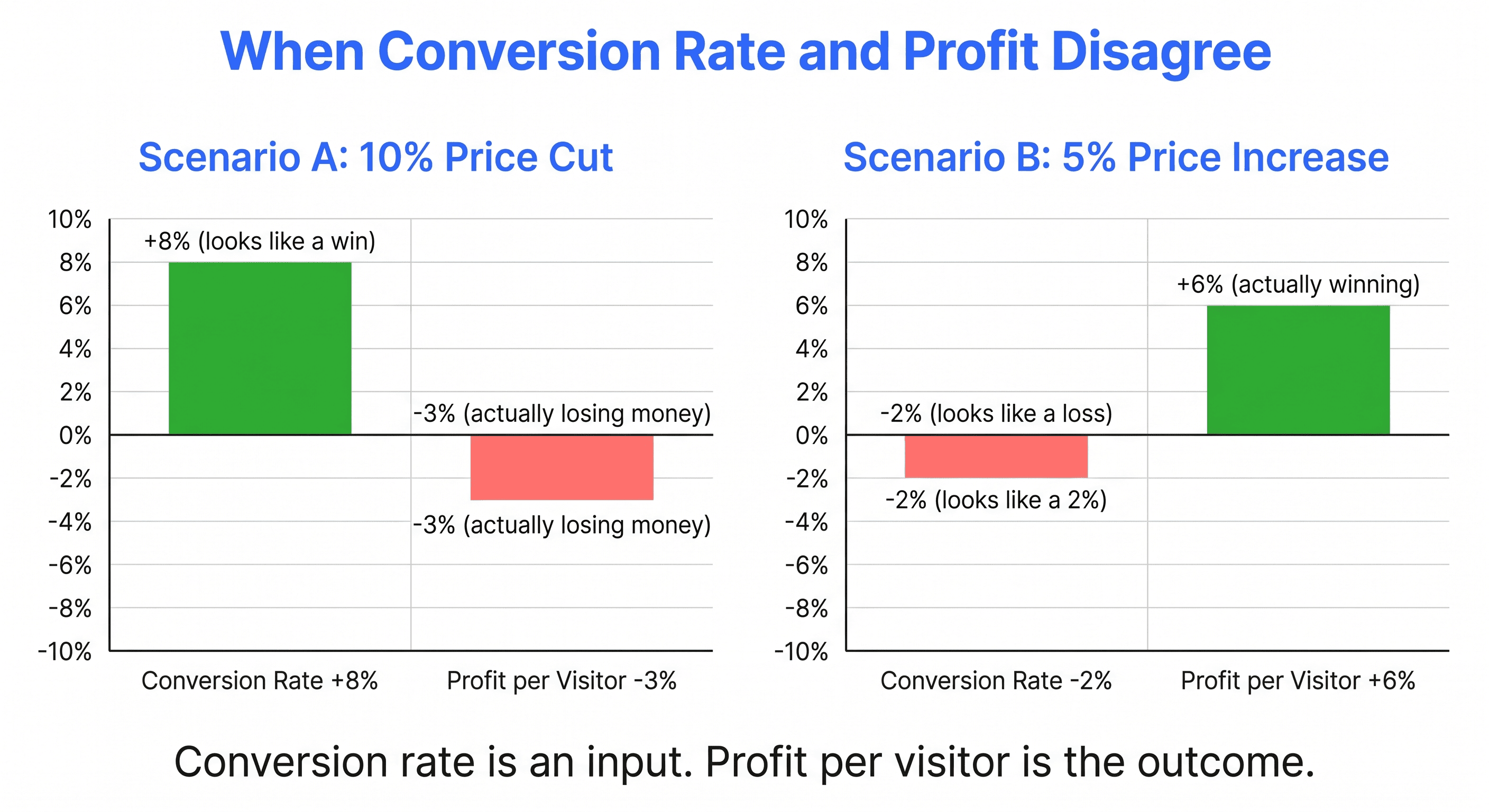
Shopify's A/B mode reports conversion rate and sales. Intelligems reports profit per visitor. Those can point you in opposite directions.
A 10% price cut might lift your conversion rate by 8%. Sales look up. The dashboard says you won. But if your margin was already thin, that price cut may have compressed it so much that you're actually making less money per visitor than before.
A 5% price increase might drop your conversion by a few points. Sales look flat or slightly down. The conversion-rate dashboard says you lost. But the customers who did buy spent more, your margin recovered, and your profit per visitor went up.
Conversion rate is an input. Profit per visitor is the outcome that pays the bills. If your testing tool only shows you the input, you can win on the dashboard and lose on the P&L.
This is also why Shopify explicitly tells you to "manually monitor for negative profit impact" during a test. The tool isn't watching for it because it isn't measuring it. If you want profit to be the deciding metric, you need a tool that calculates it for you.
When Shopify Smart Pricing Might Be Enough
The recommendation engine can be a useful nudge for some stores. If you're a small catalog brand with no pricing intuition yet, having Shopify flag "this product is moving fast, you could probably charge more" is better than nothing.
It can also work as a starting point for stores that haven't engaged with pricing at all. Apply a suggestion, watch sales for a few weeks, decide whether to keep it.
The caveat is that you won't know whether the new price actually beat the old one. You're swapping one untested price for another untested price, with a confidence boost from Shopify's pattern-matching. That can be fine for low-stakes products. For your bestsellers, where a 5% miss compounds across thousands of orders, "probably better" is a different bet than "measured better."
Víctor and the team get into the certainty-vs-confidence question on IntelliJAMS, EP 027. Worth a listen if the 95% threshold above felt high for a price decision you can reverse.
When You Need a Real Test
A few signals that the recommendation engine isn't enough on its own:
You sell high-ticket products where a single pricing call swings five or six figures of revenue. The cost of guessing wrong is too high to skip the test.
You're running promotions or discounts and want to know which percentage-off level drives the most profit, not just the most orders.
You have subscription pricing to figure out, where the discount needs to be small enough to protect margin and big enough to convert.
You sell across multiple currencies and suspect your USD-to-EUR or USD-to-GBP conversion is leaking margin.
You've already adopted a Shopify Smart Pricing recommendation and want to verify it's actually beating the old price.
You want to track profit per visitor, not conversion rate, as the deciding metric.
Any of those, and a recommendation isn't going to settle it. You need a controlled test.
What This Means for You
Shopify Smart Pricing being broadly available is genuinely a good thing for the ecosystem. It puts pricing on more merchants' radar. It gets brands thinking about whether their prices are right. That's how a lot of our customers started, by realizing they had no idea whether their prices were optimal.
A recommendation, though, isn't the same as a result. And the version of Smart Pricing that runs actual experiments has enough constraints (eligibility, single-test cap, confidence threshold, CSV-based rollout) that it isn't a complete substitute for a dedicated price testing tool. It's a starting point, not the finish line.
If you want to know whether a price change works for your customers, your products, and your margins, you need traffic split end-to-end and you need to measure the outcome that actually matters.
That's the gap Intelligems fills.
Your Data Points the Way
If you're trying to decide which approach fits your store, a few questions to sit with:
Do you want a suggestion or proof? If a suggestion is enough, the free recommendation engine may cover it. If you want proof, you need to test.
Are you optimizing for conversion rate or profit? If conversion is your decision metric, the Shopify A/B mode (where eligible) reports it. If profit is what you care about, you'll need a tool that calculates profit per visitor.
Does your store actually qualify for the Shopify A/B mode? US-based, Grow plan or higher, 10+ products with 25+ monthly sales each, single US catalog. Many stores will fall outside that.
How much flexibility do you need? Discount testing, subscription pricing, multi-currency, more than one test at a time, partial application of winners. None of that is in Shopify's native pricing tooling today.
Pricing isn't permanent. You can change it back. The question is whether you want to keep guessing, or actually know.
Price Testing
Price Testing
Analytics