Product Updates
Q3 2026 Product Recap
Q3 2026 recap including Atlas agents that build and check your tests, upsells on every page, new offer and checkout blocks, and test creation with Intelligems MCP.
In Q3, we put upsells on every page of the shopper journey, gave Atlas a bigger role in building and checking tests, and made more of Intelligems usable from Claude, ChatGPT, and Gemini. Here's what shipped between July 1 and September 30.
Atlas Builds and Checks Your Tests
Atlas now helps at three points in the workflow: building the experience, editing it, and checking it before launch.

In August, the Atlas QA Agent went live for everyone. It reviews your test configuration and storefront before launch, flags misconfigurations and best-practice gaps, and returns a shareable report with screenshots that explains what to fix.
The Atlas Experience Builder (Beta) takes a prompt and builds a full test or personalization, from the modification to test groups and audience targeting. It launched for content experiences in August and added Merchandising in September. The Atlas Visual Builder, now the one place to make content edits, also picked up a prompt idea library, URL entry, and a toggle to compare pages before and after a change.
Atlas QA Agent: errors, recommendations, and passed checks, with a clear "ready to launch" state. Live to all customers
Atlas Experience Builder (Beta): builds content and Merchandising experiences end to end
Atlas Visual Builder: handles more complex requests, understands the element you select, and saves uploaded images to your Shopify Files library
Recommended Upsells on Every Page
Product upsells now run on product pages, in the cart, at checkout, and after purchase, all testable in one place.

Post-Purchase Upsells left beta in July and are now available to all customers. Over the quarter they gained a countdown timer, first-name greetings, compare-at price display, and support for digital products and Shop Pay.
In September, Onsite Upsells went live for everyone. Describe the upsell to the Atlas Visual Builder, and it reads your site and builds it on the PDP, cart drawer, or cart page, with no separate app or theme edits. Checkout and onsite upsells each have a dedicated analytics page, so upsell revenue is easy to read on its own.
Post-Purchase Upsells: live to all, with timers, dynamic personalizations, and automatic currency targeting
Onsite Upsells: PDP, cart drawer, and cart page, with discount support
Onsite Upsell Bundles (Beta): build bundle upsells in the Atlas Visual Builder, with discount tiers based on how many items are bought together
New Checkout Upsell and Onsite Upsell analytics pages
Target upsells and offers by whether the cart includes a subscription
New Ways to Build Offers and Checkout
A new offer type and new checkout blocks give you more ways to test what moves order value.
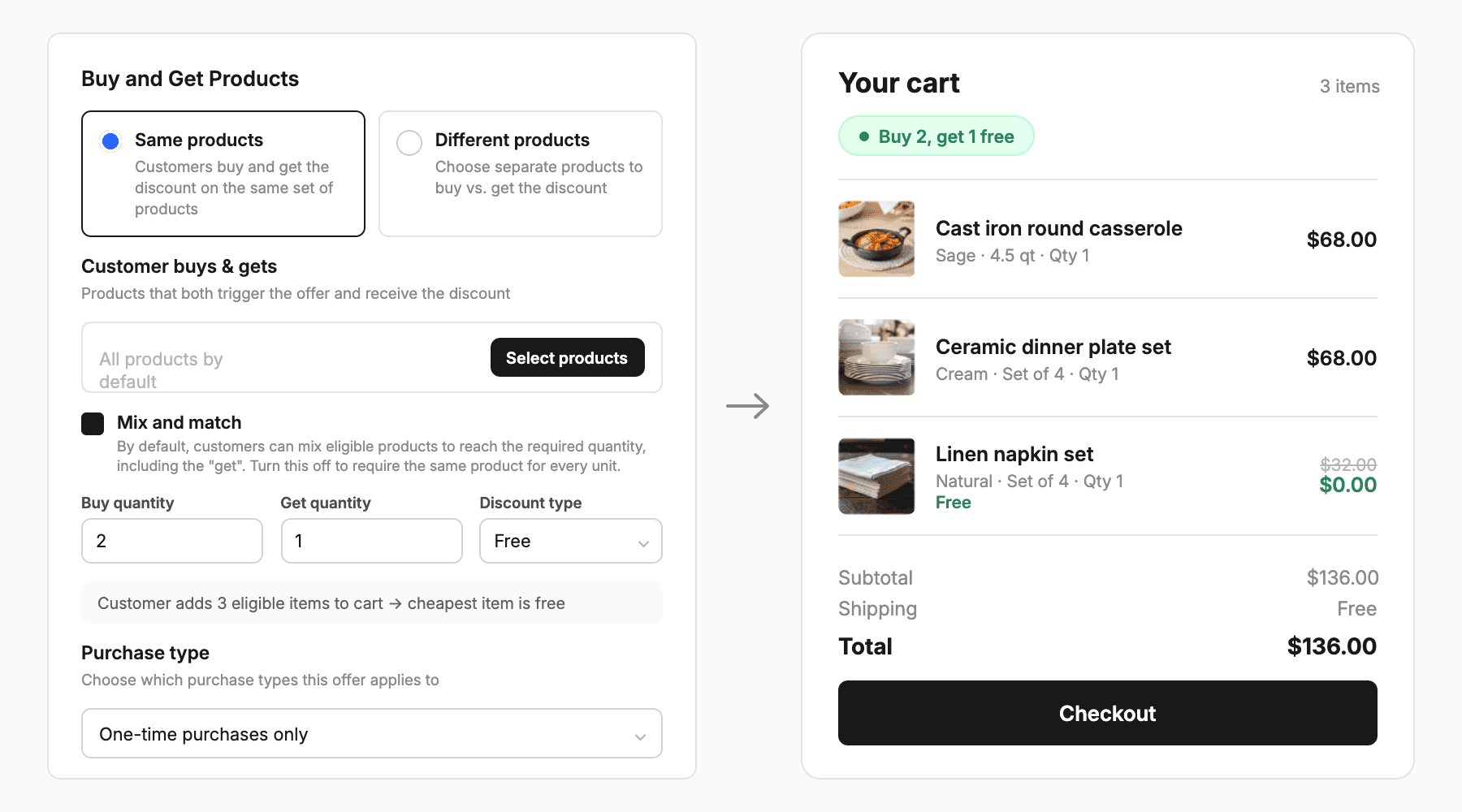
Buy X Get Y offers launched in August. Run "buy 2, get 1 free" style promotions where the reward is free, a percentage off, or a set amount off, and test them against your other offer types.
Checkout got a Shipping Progress Bar block that updates with the cart, plus Display Conditions so any block shows only for carts that match a rule. Countdown timers can now reset on a schedule, and the in-app checkout preview matches your live styling.
Buy X Get Y: applies to one-time purchases, subscriptions, or both
Shipping Progress Bar checkout block
Display Conditions across all checkout block types
Recurring hourly, daily, or weekly timers, and volume discounts with up to 7 tiers
Run Intelligems from Claude, ChatGPT, and Gemini
Intelligems is now in the Claude Directory, and you can create price tests and checkout block tests with the Intelligems MCP.

Search "Intelligems" in the Claude Directory and connect in one click. Connect to Gemini and ChatGPT from the Integrations page. From there you can create and update price tests, build checkout block tests, and add custom events and metrics. The MCP and API also return test verdicts and post-test metrics, and support every dashboard filter.
Price tests and checkout block tests: create and update through the MCP and API
Custom events and custom metrics through the MCP and API
Test verdicts, post-test metrics, and every dashboard filter across all endpoints
Test history shows whether a change came from the app, API, or MCP, and checkout line items flag upsell revenue
Sharper Audience Targeting and Measurement
Target shoppers by how likely they are to buy, and measure across more of your site.
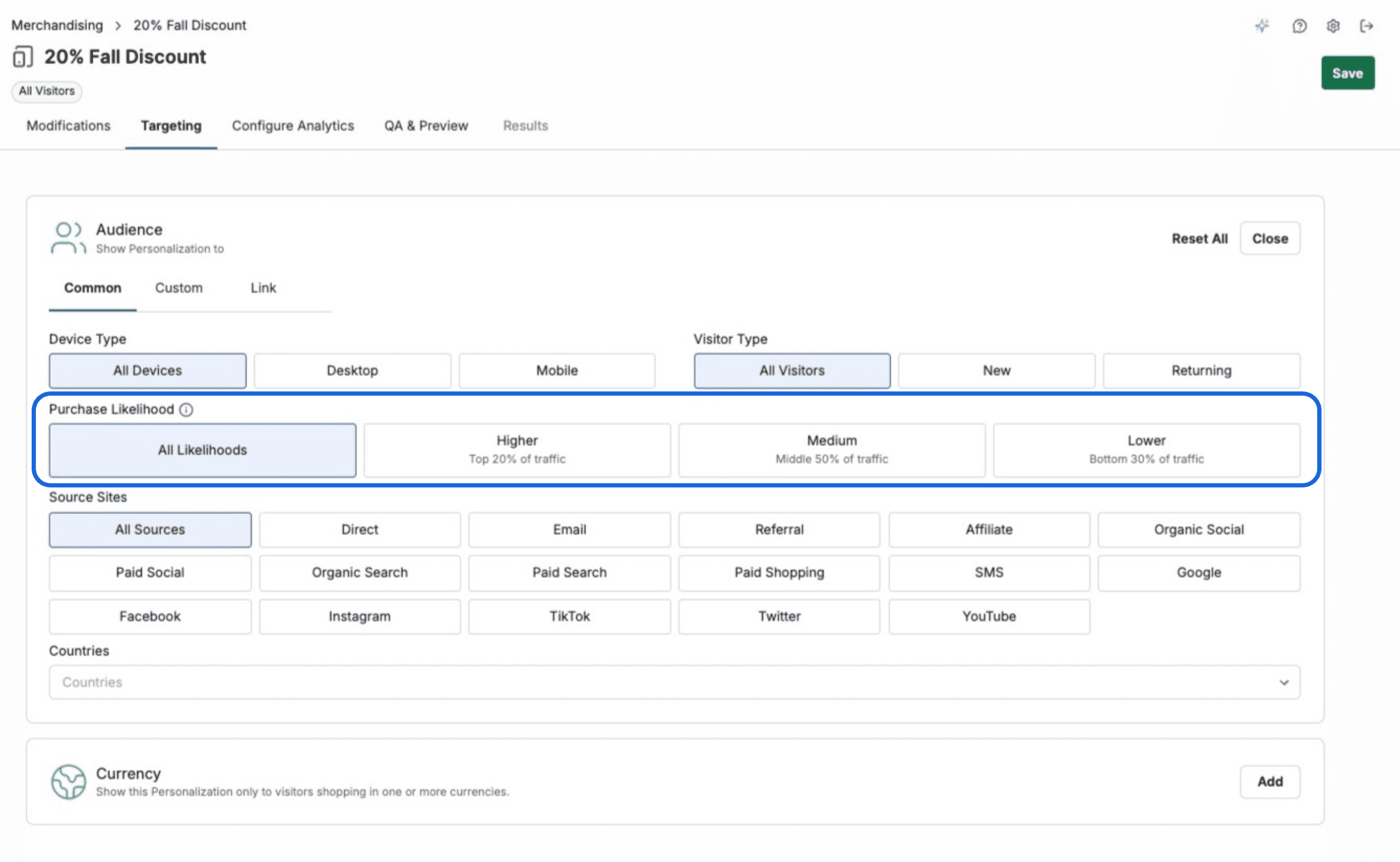
Purchase Likelihood Targeting (Beta) lets you show an experience only to shoppers at a given likelihood to purchase. Then compare how each group responds in the By Audience results table. It works with Merchandising, Shipping, and Checkout & Post-Purchase experiences.
Intelligems also now tracks on any page where it's installed, including landing pages not hosted on Shopify, and carries identity across subdomains. Page content is hidden during load only for visitors who are actually in a test.
Purchase Likelihood Targeting (Beta), with a new Purchase likelihood tab in By Audience results
Mutually exclusive tests on for every store, and you choose which experience to exclude
Exclude countries in analytics filters, plus a new "Viewed Checkout Block" filter
Tracking on non-Shopify landing pages, with identity carried across subdomains
Email support@intelligems.io to request beta access →
Also Shipped in Q3
Self-serve customers on Smart Content can try other modules free for 14 days.
Merchants using custom shipping can connect a UPS account for tailored UPS rates.
Shipping tests are ready for Shopify's market-based shipping setup.
Price tests in a non-default currency export in Shopify Markets catalog format, and price test CSVs include SKUs.
Collection targeting includes collections built with Shopify's newer options.
Upsells can filter by multiple tags or collections, and checkout upsells can add a variant already in the cart.
Experience summaries know when a test is too early to call, and verdicts note when data is filtered.
Analytics dashboards show when org-wide settings are excluding data.
A new wizard guides you through adding domains in settings.
Slack test-complete and Big Win alerts show the actual result and likelihood to beat the original.
Product Updates
Product Updates
Analytics