
AB Testing
Do I need a separate app for quantity breaks if I use Intelligems?
Quantity break discounts are one of the simpler ways to nudge profit per visitor upward. Show customers a better deal for buying more units, and some of them will.
Quantity break discounts are one of the simpler ways to nudge profit per visitor upward. Show customers a better deal for buying more units, and some of them will. It doesn't require a rebrand or a new product line — just a tiered pricing structure on your product page.
If you're already running this with a dedicated app like Kaching Bundles, DealEasy, or Fast Bundle, there's something worth knowing: Intelligems has quantity buttons built in. No extra app. No extra monthly bill. And based on real data from a brand that made the switch, the built-in version can outperform the dedicated one.
Here's what that looks like in practice.
What Quantity Buttons Are (and Why Shopify Can't Do It Alone)
Shopify's native discount system works at checkout. Discounts get applied silently, after a customer has already decided what to buy. There's no way to show tiered pricing on the product page itself.
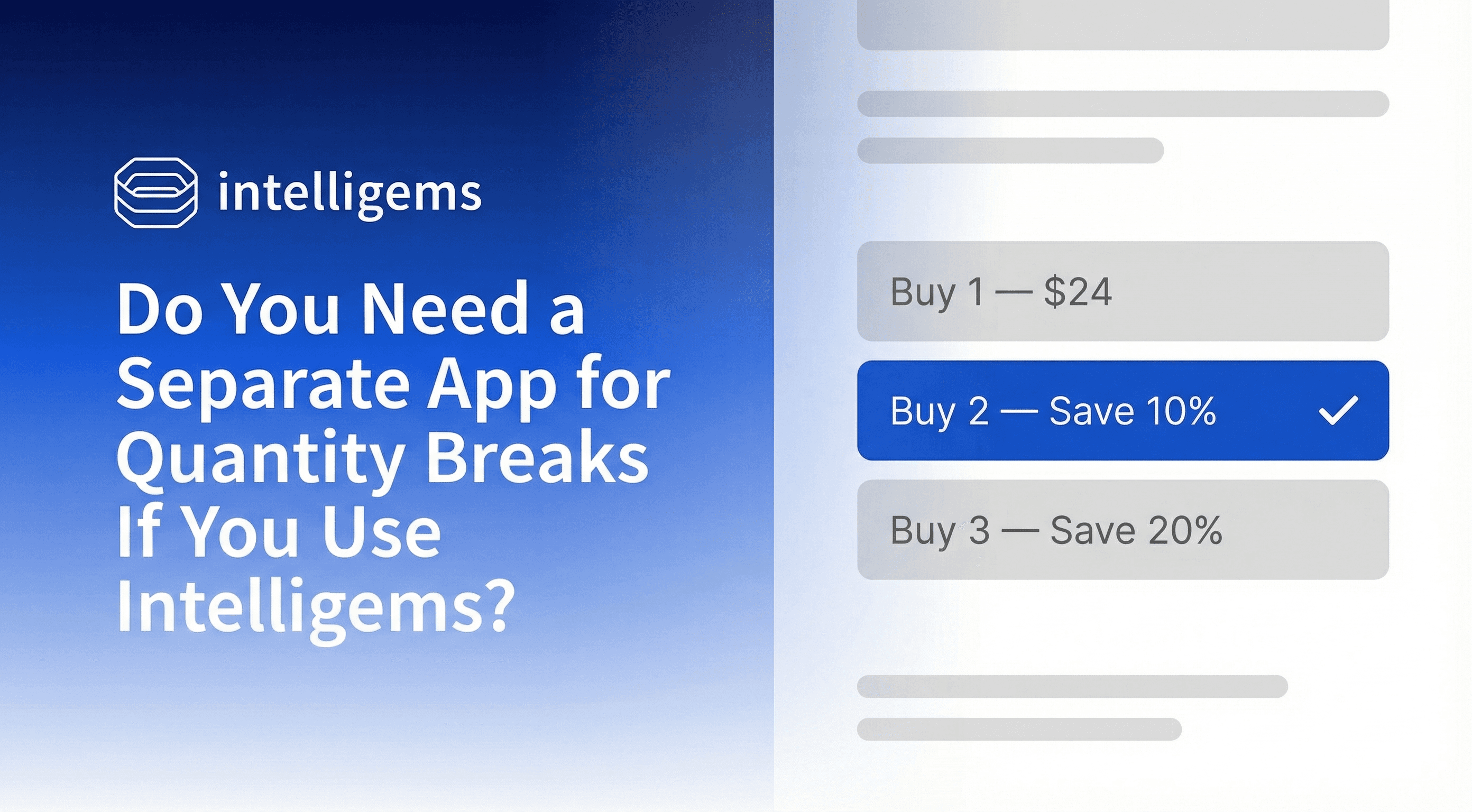
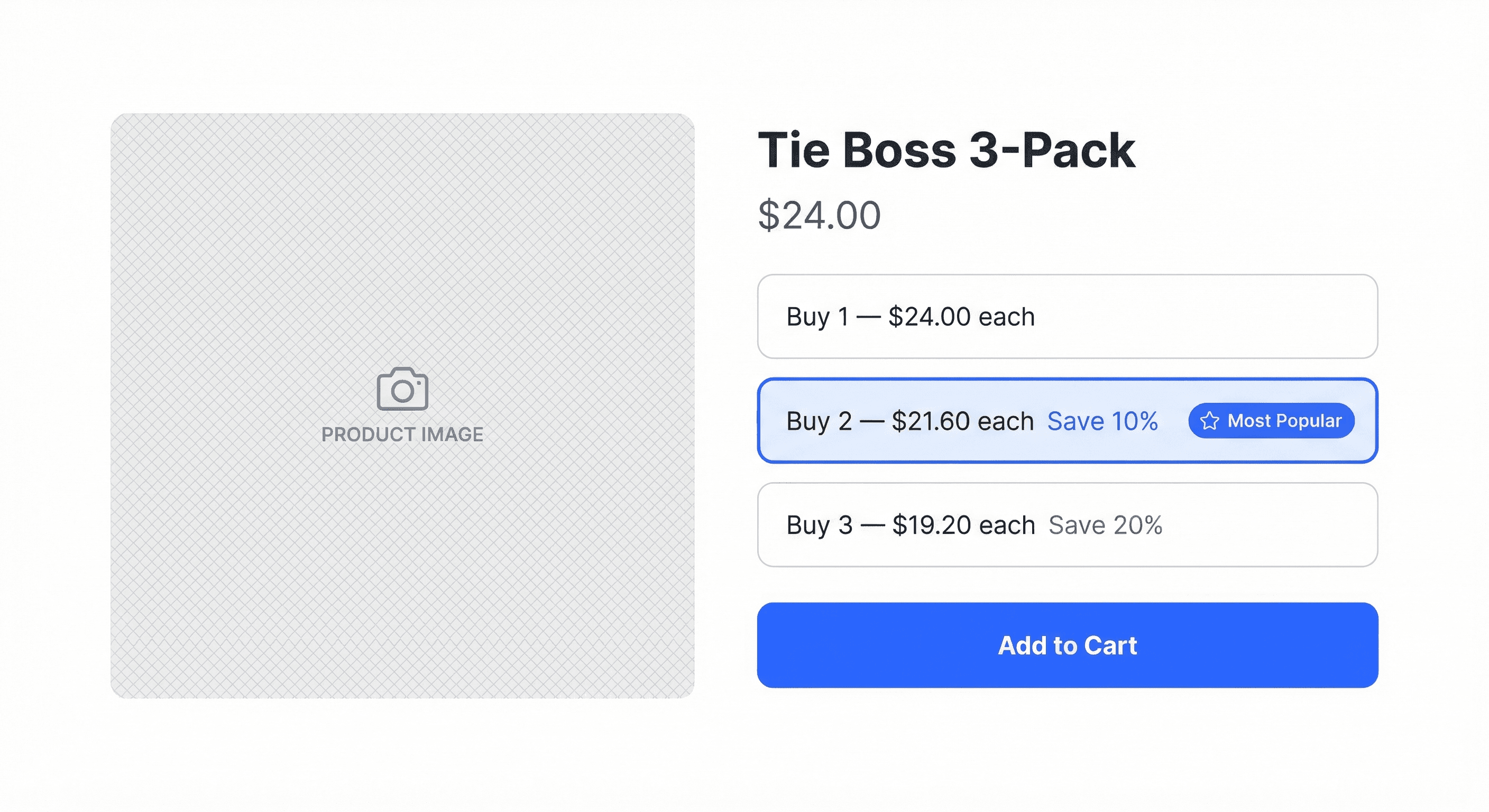
That gap is where quantity button apps come in. They add a visual UI to your PDP — something like "Buy 1 at $24 / Buy 2 and save 10% / Buy 3 and save 20%." The customer sees the incentive before they commit, while they're still deciding.
That visibility matters. When the offer is explicit, some customers will stretch to the next tier. When it's hidden until checkout, they often won't.
Apps like Kaching Bundles, DealEasy, and Fast Bundle have built their whole products around this gap. They work. But they're also a separate tool to install, configure, style, and pay for every month.
Intelligems Has This Built In
Quantity Buttons are part of the Intelligems offer experience suite, included in all plans. You can configure tiered pricing the same way you would in any dedicated app: set the number of tiers, define the discount at each level, style it to match your store.
What's different is where it lives. Because it's inside Intelligems, the performance data flows into the same analytics as everything else you're testing. You can see whether your quantity break structure is moving profit per visitor, not just units sold.
Dedicated bundle apps can typically tell you that customers bought 2-packs more often. They can't tell you whether that resulted in more profit or less. The difference matters, because deeper discounts can increase AOV and compress margin at the same time.
We discussed the PDP testing mindset in this IntelliJAMS episode — the thinking applies directly to how you structure and evaluate quantity break offers:
For merchants already on Intelligems, this also means one less app to manage, one less monthly bill, and one less dashboard to reconcile with your actual results. The offer and the analytics live in the same place.
What One Brand Found When They Switched
Tie Boss had a quantity button app running on their PDP. Volume discounts were live, tiers were visible, customers were buying.
They wanted to consolidate their stack and run everything inside Intelligems — but only if performance held up. So they ran a test. Control: their existing quantity button app. Variant: Intelligems Quantity Buttons with near-identical settings, styling, and pricing.
The results:
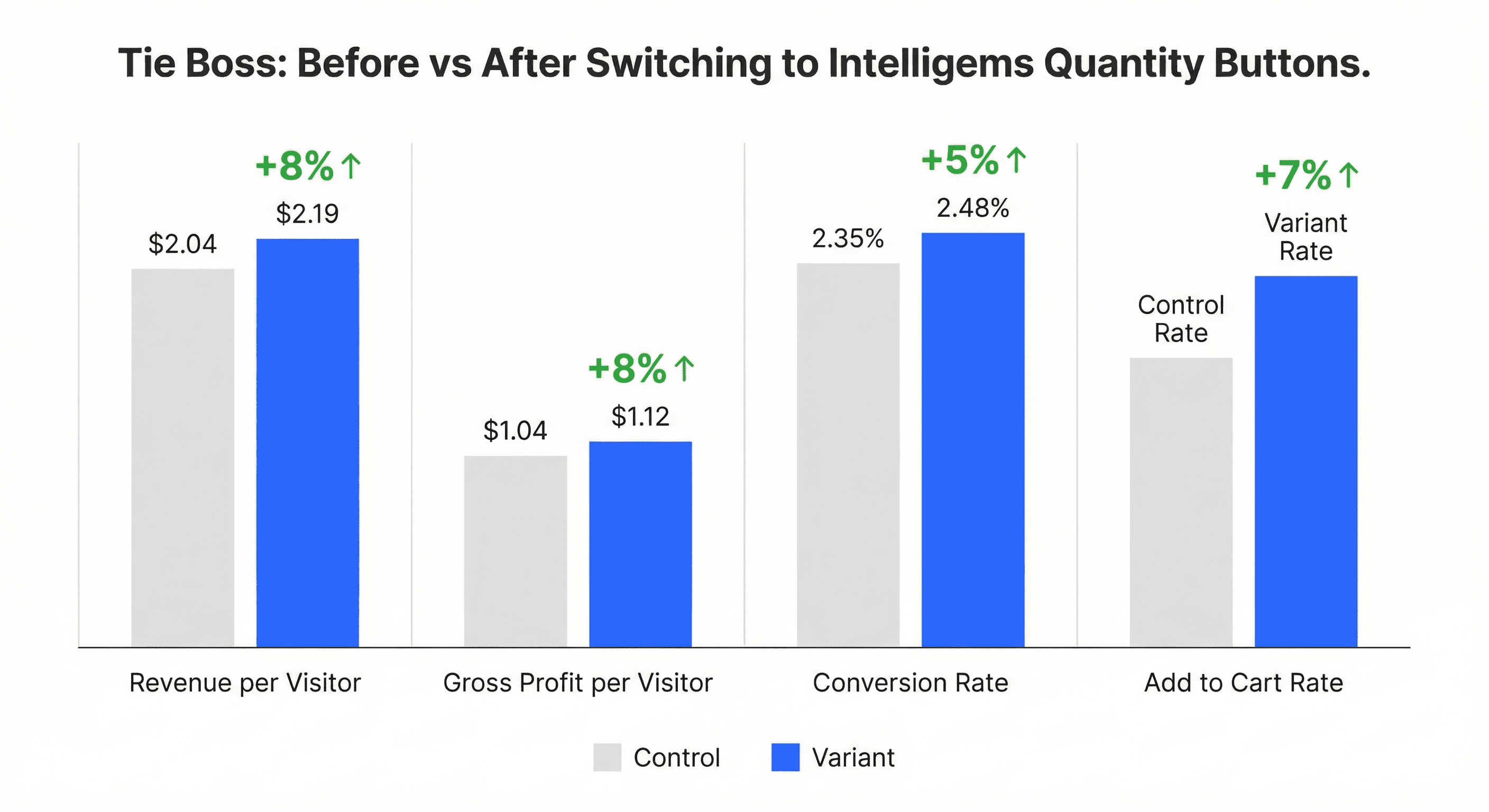
Revenue per visitor: +8% ($2.19 vs $2.04)
Gross profit per visitor: +8% ($1.12 vs $1.04)
Conversion rate: +5% (2.48% vs 2.35%)
Add to cart rate: +7% (97% probability to beat control)
Same offer, better performance. The built-in feature wasn't a downgrade.
Why did it win? Possibly page performance. Possibly subtle UX differences. Possibly integration quality. The test didn't reveal the mechanism — it revealed the outcome. And that's enough to act on.
"If you are using a third-party quantity buttons app, you can confidently test replacing it with Intelligems and measure the impact directly."
What to Actually Test Once You're Set Up
Switching apps is the easier part. The more interesting opportunity is what comes next.
Quantity break structures often get set once and left alone. A merchant picks 10% at 2 units and 20% at 3 units because it felt reasonable, and the setup never gets revisited. But the right structure depends on your customers, your margins, and your product — and those vary.
A few things worth testing:
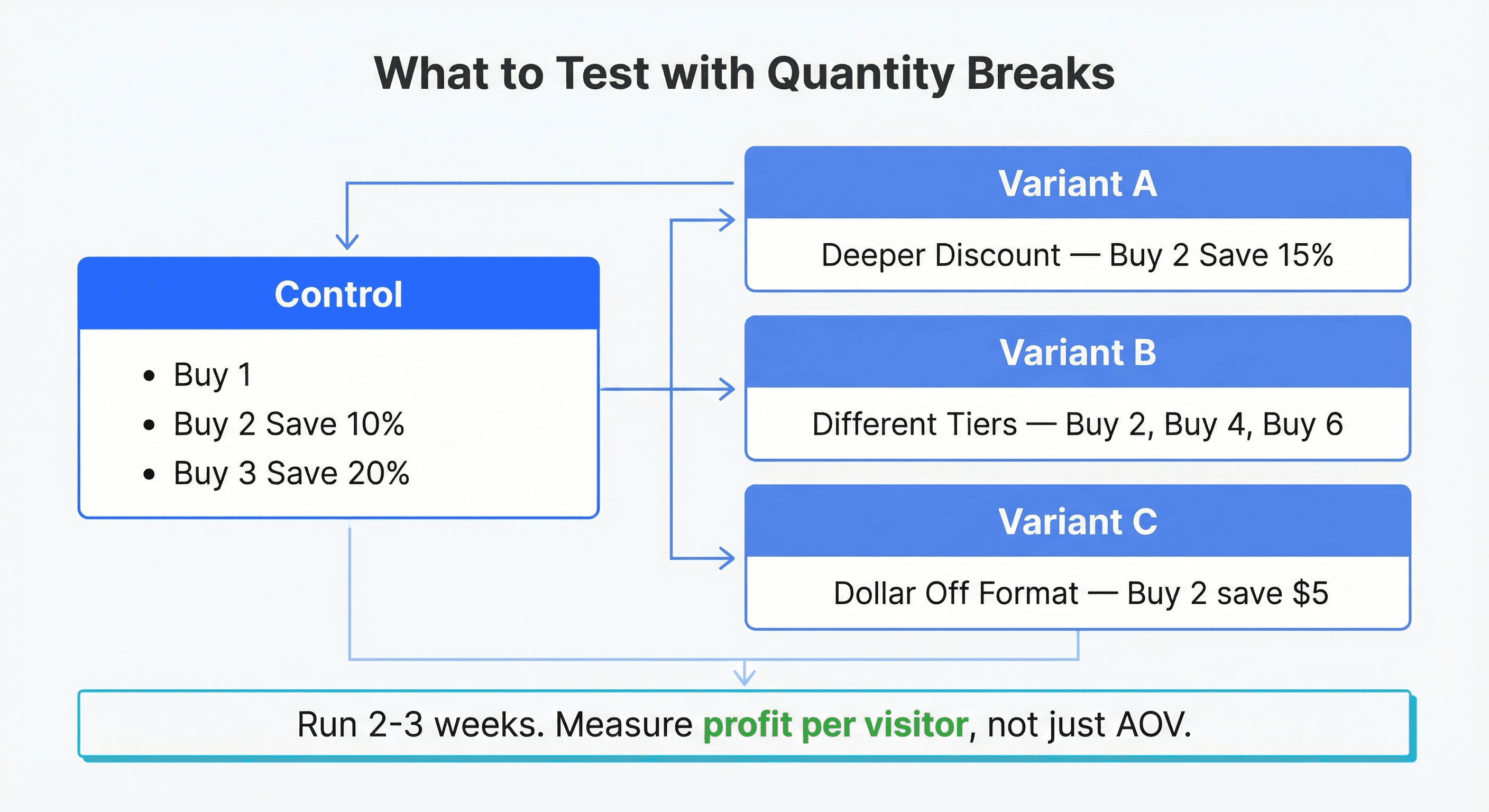
Discount depth. Is 10% at the 2-unit tier the right number? It might be too shallow to motivate the stretch. Or it might be more generous than needed. Testing 8% vs 12% vs 15% can reveal where the threshold actually sits for your customers.
Tier structure. Does a 2/3/6 ladder work better than 2/4/8? For some products, customers think in pairs. For others, they think in bulk. The tier structure that matches how your customers naturally buy tends to outperform one that doesn't.
Discount format. The tiered vs. flat discount question applies here too. Percentage off, dollar amount off, and fixed price per unit can each feel different to a customer even when the math is close to identical.
These aren't hypothetical tests. They're the kind of questions that can sit unanswered for years when the app running the feature has no testing capability. Intelligems does.
Data Signals Worth Watching
Before picking a test, it helps to look at what your current data suggests. A few patterns worth checking:
A high add-to-cart rate with low multi-unit purchase rate can suggest customers are interested but not incentivized enough. The discount might need to go deeper, or the tiers might not be prominent enough.
Single-unit purchases on a product that logically comes in multiples — consumables, accessories, giftable items — often indicate untapped volume potential. That's typically the best signal for what to test first.
AOV that isn't moving despite active quantity breaks can mean the tiers aren't hitting the right thresholds. Customers aren't stretching. The offer might need restructuring rather than just deepening. Check how to increase AOV for a fuller picture of what's worth measuring.
Whatever you find, measure in profit per visitor when you test. AOV going up while margin compresses can look like a win and function like a loss.
Stop Guessing. Start Knowing.
If you're on Intelligems, Quantity Buttons are already available. The feature is there, included in your plan. If you're on a dedicated quantity break app, Tie Boss is a data point worth considering — same settings, better results. And if you're running quantity breaks and haven't tested the structure, that's typically where the most accessible improvements are waiting.
Don't guess how your quantity break structure is performing. Know.
Want to build a testing practice around your offers — from quantity breaks to shipping thresholds to pricing? Join GEM Academy — free courses and a community of brands sharing what's working.
AB Testing
AB Testing
AB Testing


