Product Updates
Q1 2026 Product Recap
Including AI-powered optimization tools, a new analytics layer, major checkout updates, and a faster way to build and target tests. 50+ updates.
Q1 2026 brought the biggest changes we’ve ever released in a single quarter: AI-powered optimization tools, a new analytics layer, major checkout updates, and a faster way to build and target tests.
Your Store's Data, Powered by AI
Connect your testing, personalization, and sitewide analytics data to the AI tools your team already uses.
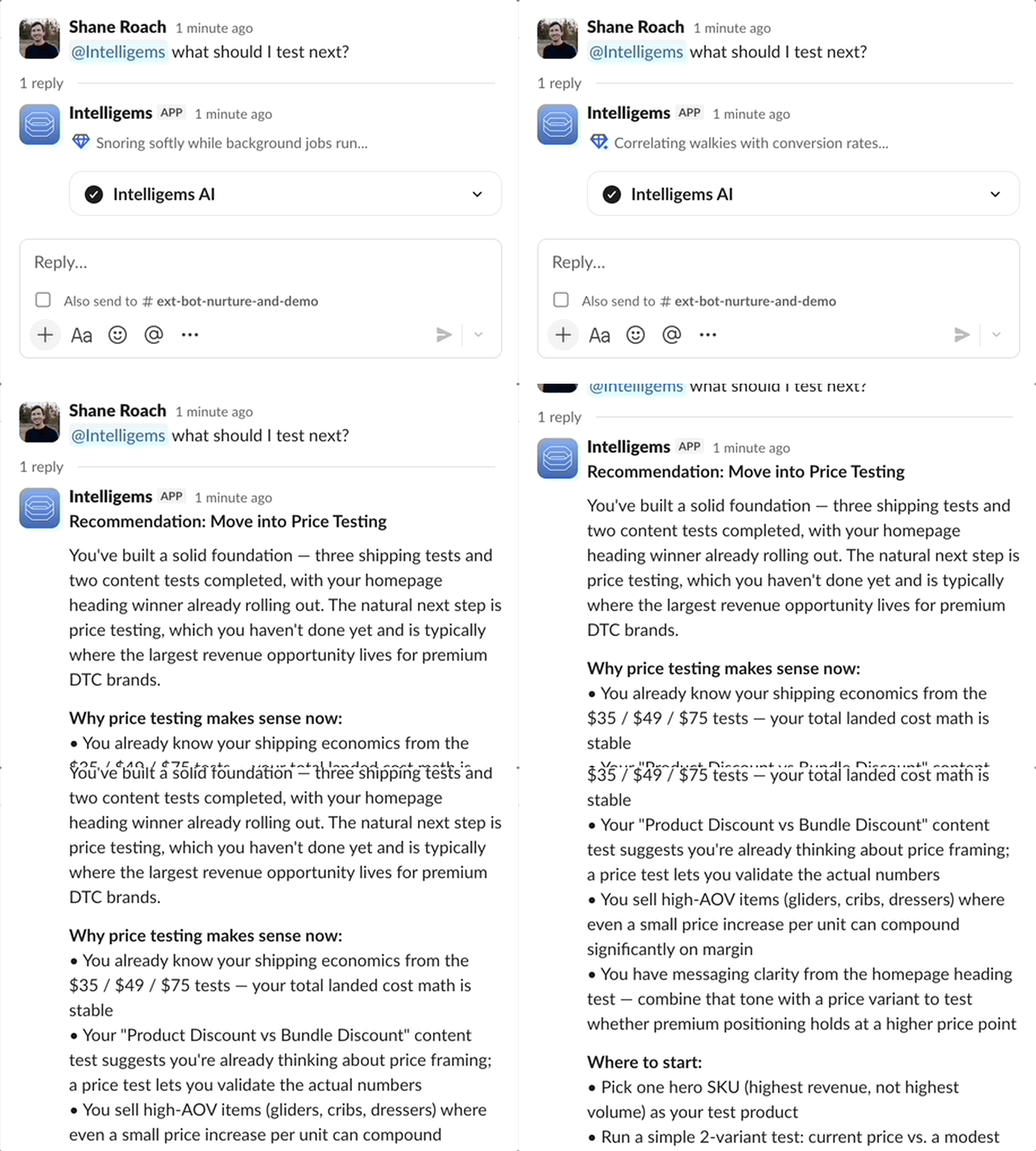
The biggest shift in Q1 wasn't a single feature. It was a new way of working. Intelligems launched an MCP server that lets you query your test data, personalization performance, and sitewide analytics directly inside Claude, ChatGPT, or Gemini. Ask a question in plain language, get a data-backed answer.
From there, the intelligence got built into the platform itself. Smart Test Recommendations Beta analyzes your store's performance and surfaces high-impact test ideas automatically, right on your dashboard and analytics pages. And the Intelligems Slack Bot brings all of that data right into Slack. Ask @intelligems about any test, get alerts when results are ready, explore your data, and escalate your question to our Customer Support team without leaving the channel.
Connect Claude, ChatGPT, or Gemini to your Intelligems data via MCP
Get AI-generated test suggestions based on your store's actual performance data
Ask the @intelligems Slack Bot about test results, get milestone alerts, and receive daily or weekly summaries
A New Analytics Layer
Understand your store's performance, going beyond individual experience results.
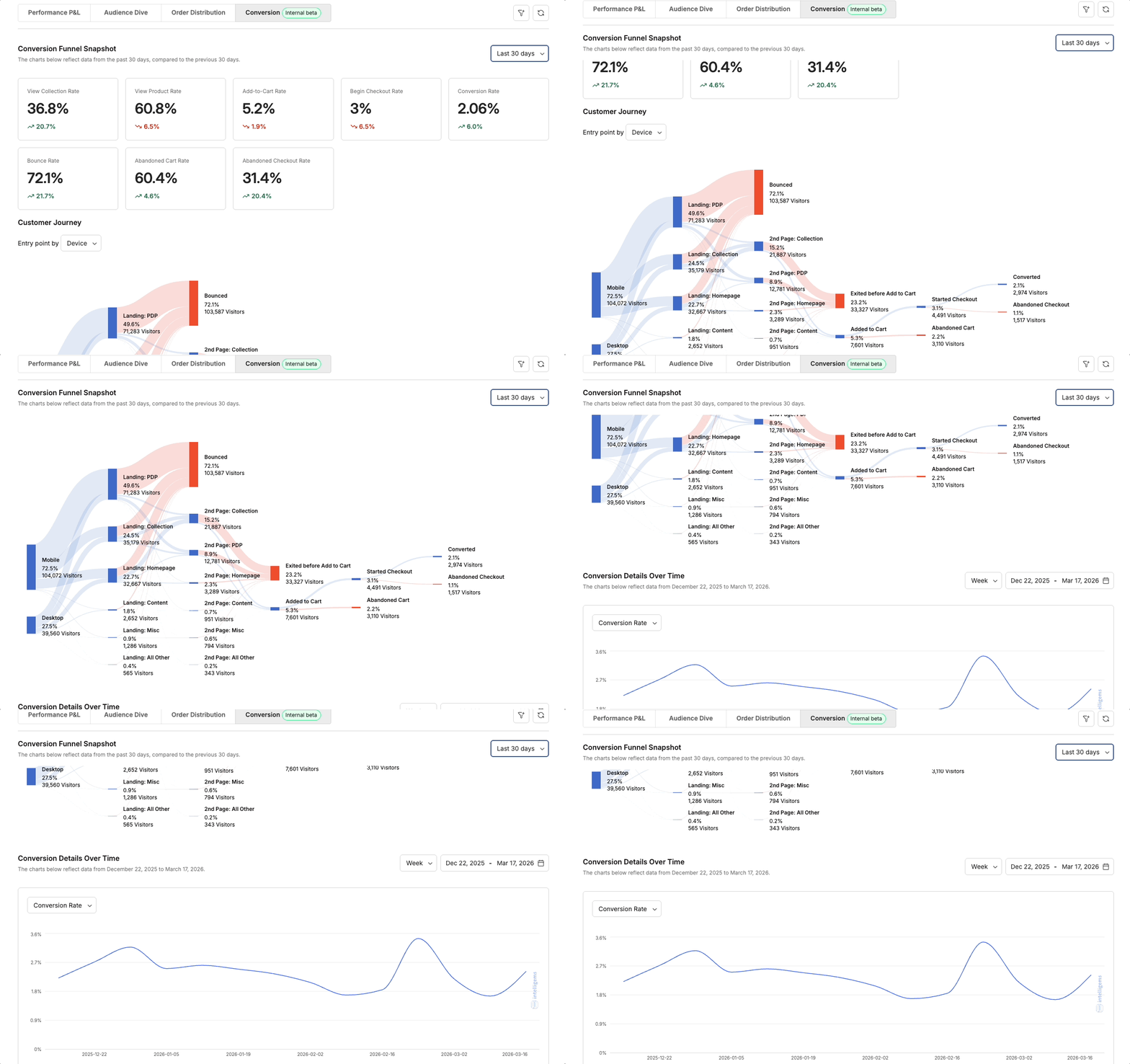
The Sitewide Analytics suite expanded significantly. A new home page consolidates all dashboards in one place, and a new Conversion Page shows how visitors move from landing to purchase using a Sankey-style funnel visualization. Checkout Upsell Block Analytics adds upsell revenue and order percentage metrics directly into your test results.
For agencies and teams building their own reporting, chart images are now available via the External API, and all Sitewide Analytics data can be pulled programmatically through API endpoints and MCP tools. Metric Filters let you segment test results by device type, visitor type, source channel, landing page, country, custom events, and more, both in-app and via API.
Sitewide Analytics: Conversion page shows your full funnel from landing to purchase
Filter test results and sitewide analytics by device, source, audience segment, order value, and more
Export chart images via External API to embed directly in client reports or Slack
All Sitewide Analytics data now available via External API, MCP tools, and @intelligems Slack bot
Post-Test Metrics page allows you to monitor ongoing performance after a test ends
More Control at Checkout
Checkout became the most-improved storefront area this quarter. Shopify Plus only

The basics shipped first: A/B test product upsell blocks at checkout, apply discounts to those upsells, and test different header images. Then in March, Dynamic Checkout Upsells took it further. You can now define cart-based rules that surface the right product depending on what's already in the cart: by product, tag, collection, subtotal, or item count. A built-in cart tester lets you simulate different scenarios before going live.
Quantity Buttons also got meaningful updates. You can now set a default tier selection to highlight a preferred option like "Buy 3," display pricing on a per-item basis, and upload product images directly from Shopify. Image cropping for Checkout Experiences gives you more control over how assets are presented.
Test upsell blocks at checkout and apply % or fixed discounts
Dynamic Upsells: show different products based on cart contents, tags, collections, or subtotals
Test logos, banners, or trust signals in the checkout header
Upsell blocks now support up to 3 products. Shoppers pick their variant at checkout.
Set a default Quantity Button tier to steer customers toward higher-value purchases
Display price per item on Quantity Buttons
Crop checkout images 1:1 or keep the original aspect ratio
Set up a checkout upsell test →
Easier to Build, Target, and Share
The core experience workflow got faster and more flexible across the board.
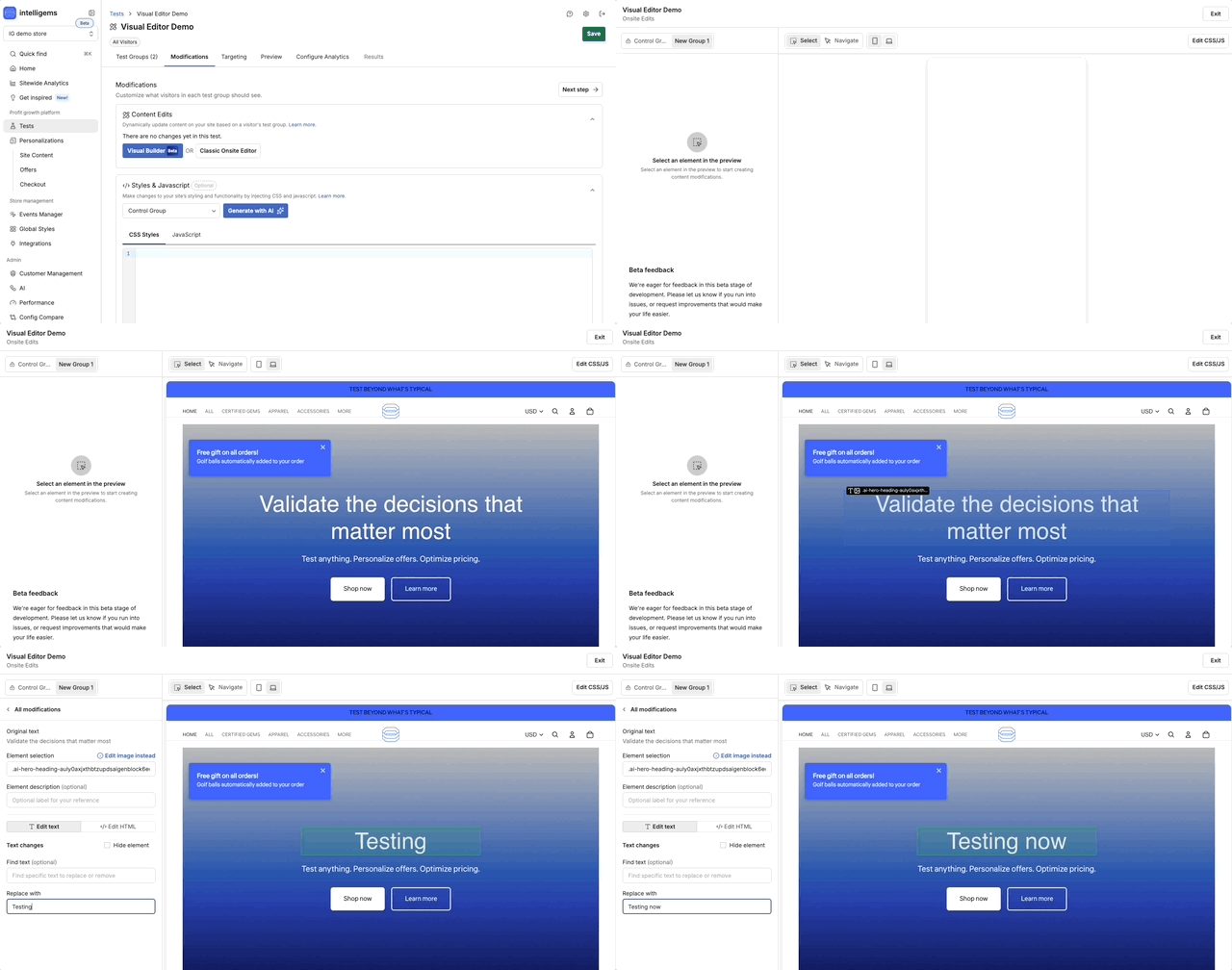
The Visual Editor Beta is the most visible change here. You can now make onsite edits directly inside Intelligems by clicking elements in a live preview of your store, without using the onsite editor widget. Product Targeting lets you apply content changes to specific products based on inventory levels, prices, tags, or collections. Layer those rules on top of audience and page targeting.
The new Klaviyo integration brings customer segment targeting into tests and personalizations. The Get Inspired page gives merchants a browsable library of test ideas, templates, and tutorials organized by category. And Share Test Results lets you generate a public link to your results, so clients, agencies, or stakeholders can see performance data without needing an Intelligems login.
Visual Editor Beta: click-to-edit your storefront directly in Intelligems
Target content edits to specific products by inventory, price, collections, or tags
Use Klaviyo segments for audience targeting on tests and personalizations
Track any custom event as a metric on Personalizations
Browse test ideas and launch-ready templates on the Get Inspired page
Share test results with a public link, no login required
Multiple domains now supported under one org for Split URL tests
Template tests now work on list-collection page types
Also Shipped in Q1
Products can be added or removed from live price tests without pausing
All users can now generate API keys directly from the Integrations page
COGS file downloads pre-fill your existing values so edits are faster
Metric filters are available via External API
Free gift thumbnail hiding option for Offer Experiences
Include Free Orders toggle in analytics, for stores testing free items or free trials
Sitewide Analytics Order Distribution page is now open to all customers
Volume Discount in Offers is now split into two distinct types: Quantity Discount and Threshold Discount
plus dozens of under-the-hood updates that make Intelligems faster and better every day!
Product Updates
Product Updates
Product Updates